
App Name
Clone Master
Version
2.8.0.10
Last Updated
Aug 5, 2026
Requirements
7.0 and up
Downloads
1,000,000+ downloads
Size
12.1 MB
Screenshot
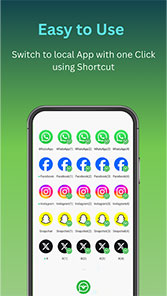
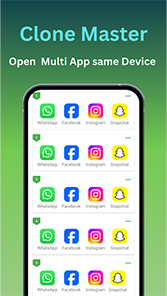
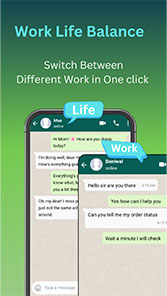
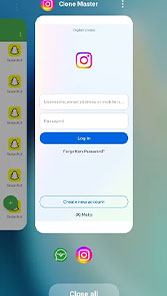
Clone Master – Multi Dual Space
Clone apps and manage multiple accounts on one Android device
[Download Clone Master]
Welcome to Clone Master
Using more than one account on the same phone can become annoying. You log out of one account, enter another username and password, and then do the same thing again when you need the first account. After a while, it simply gets tiring.
Clone Master – Multi Dual Space offers a simpler way to handle supported apps. It creates a separate copy of an app, so you can use another account without removing or replacing the original one.
The app supports social media, messaging, gaming, streaming, and selected Google applications. You can also change the name and icon of a clone and manage its permissions. No root access is required.
Multiple Accounts on One Phone
Having two accounts does not always mean you need two phones. For example, you may want to keep a personal Instagram account and another account for work. The same situation can happen with messaging apps, games, or other services. Switching between accounts again and again can waste time and become frustrating.
With a separate copy of a supported app, each account can stay in its own place. You can open the original app when you need one account and use the clone for another. It is a small change, but it can make everyday account management much less of a hassle.
Key Features
App Cloning
Choose a compatible app and create another copy of it through Clone Master. The original app stays on your phone, while the new instance can be used for another account. You do not have to remove your existing app just to use a different login. Of course, cloning does not work perfectly with every application. Some apps have their own technical or security restrictions.
Multiple Account Support
Managing several accounts becomes easier when they do not all have to share the same login session. You can keep different profiles for personal use, work, gaming, or other purposes in separate app instances. That means less logging out, fewer repeated logins, and less time spent trying to remember which account is currently active.
Custom Names and Icons
When several copies of an app look exactly the same, it is easy to tap the wrong one. Clone Master lets you change the name and icon of a clone. You can give each copy a name that makes sense to you and choose an icon that helps you recognize it at a glance. That little bit of customization can save you from opening the wrong account over and over again.
Permission Management
You can manage permissions for cloned applications individually. This gives you more control over what each copy of an app is allowed to access on your device.
Incognito Login
Clone Master includes an incognito login feature for cloned applications. For people who prefer to keep their different login sessions more private and separate, this provides an additional option when using cloned apps.
No Root Required
You do not need to root your Android phone to use Clone Master’s app-cloning features. You can install the app and use its core cloning functions without making system-level changes to your device.
Social Media and Messaging Apps
Keeping personal and work accounts separate is one of the common reasons to use an app-cloning tool. Clone Master lists several popular social and communication apps, including WhatsApp, Facebook, Instagram, LINE, Signal, Telegram, IMO, and Snapchat.
Instead of logging out whenever you need another account, you can use the original application and its compatible clone separately. It can be especially convenient when you check a work account during the day but still want your personal account available without the constant back-and-forth.
Gaming Apps
Managing two gaming accounts can be frustrating when the game only gives you one active login. Clone Master can create a separate instance of compatible games, giving you another place to sign in.
This means you can keep another gaming account available without replacing the existing installation. Game compatibility is not the same for every title. Some games may not work correctly after cloning because of their own technical requirements or restrictions.
Streaming Apps
Clone Master also lists several streaming applications among its supported apps, including Hotstar, Netflix, Tango, Mika, and Elo Elo. If a streaming app works correctly in the cloning environment, you can use its separate instance to access another account. This can be handy when different accounts are used on the same phone and you would rather not keep signing in and out.
Google Services
Selected Google applications and services are also included in the list of supported apps. These include Google Play Store, Google Workspace, Google Sheets, and Google Meet. For users who work with more than one Google-related account, having separate app instances can make account switching less frustrating.
Keep Your Cloned Apps Easy to Recognize
Once you have several copies of different applications, finding the right one can become confusing. Clone Master gives you the option to change the name and icon of a clone. You can use simple names that immediately tell you which account you are about to open. You can also manage permissions for individual clones, giving you more control over each app instance.
Privacy and Data Separation
The original application and its clone are kept as separate app instances. This makes it easier to keep different login sessions and app environments apart instead of putting everything into one account. Clone Master also includes incognito login and permission management among its privacy-related features.
How Clone Master Works
Getting started is simple.
First, choose an application that can be cloned. Create the copy, then change its name or icon if you want to make it easier to recognize. Open the new instance and sign in with another account.
That is it. The original application stays where it was, while the clone gives you another place to use a separate account. If you have ever had to log out and sign back in several times in one day, you know how much easier this can feel.
Android 15
Clone Master is designed for the Android 15 ecosystem. The app is updated to address known problems and compatibility issues as the Android environment and supported applications change. However, the experience can still vary between different phones and applications.
What’s New in Version 2.8.0.10
The current listed version is 2.8.0.10.
The latest update includes:
- Fixed Roblox-related issues.
- Resolved several known bugs.
- Added support for full edge-to-edge display.
Compatibility
Clone Master cannot guarantee that every Android application will work perfectly after cloning. An app may crash, fail to start, or have limited features because of its own technical requirements, security restrictions, or a later update.
So, if one particular app does not work as expected, it does not necessarily mean that every other app will have the same problem. Compatibility depends on the application, its version, and the Android environment.
Download Clone Master
If switching between accounts has started to feel like a chore, Clone Master gives you another way to manage supported apps. Create a clone, sign in with another account, and keep both versions available on your Android phone.
Less switching. Less logging in. More room for the accounts you actually use.
[Download Clone Master on Google Play]
Additional Information
|
Information |
Details |
|
App Name |
Clone Master – Multi Dual Space |
|
Package Name |
com.cmaster.cloner |
|
Developer |
Benisoha Fusion |
|
Latest Version |
2.8.0.10 |
|
Category |
Tools |
|
Content Rating |
Everyone |
|
Downloads |
1,000,000+ |
|
Latest Update |
August 2026 |
|
Android |
Android |
|
Size |
Approximately 12.1 MB |
© clonemaster. All rights reserved.